Logical Model and Metadata
Logical model describes the data from user’s or analyst’s perspective: data how they are being measured, aggregated and reported. Model is independent of physical implementation of data. This physical independence makes it easier to focus on data instead on ways of how to get the data in understandable form.
See also
- Schemas and Models
- Example database schemas and their respective models.
- Model Reference
- Reference of model classes and fucntions.
- Cubes Models
- Repository of basic cubes models.
Introduction
The logical model enables users to:
see the data from the business perspective
hide physical structure of the data (“how application’s use it”)
- specify concept hierarchies of attributes, such as:
- product category > product > subcategory > product
- country > region > county > town.
provide more descriptive attribute labels for display in the applications or reports
transparent localization of metadata and data
Analysts or report writers do not have to know where name of an organisation or category is stored, nor he does not have to care whether customer data is stored in single table or spread across multiple tables (customer, customer types, ...). They just ask for customer.name or category.code.
In addition to abstraction over physical model, localization abstraction is included. When working in multi-lingual environment, only one version of report/query has to be written, locales can be switched as desired. If requesting “contract type name”, analyst just writes constract_type.name and Cubes framework takes care about appropriate localisation of the value.
Example: Analysts wants to report contract amounts by geography which has two levels: country level and region level. In original physical database, the geography information is normalised and stored in two separate tables, one for countries and another for regions. Analyst does not have to know where the data are stored, he just queries for geography.country and/or geography.region and will get the proper data. How it is done is depicted on the following image:
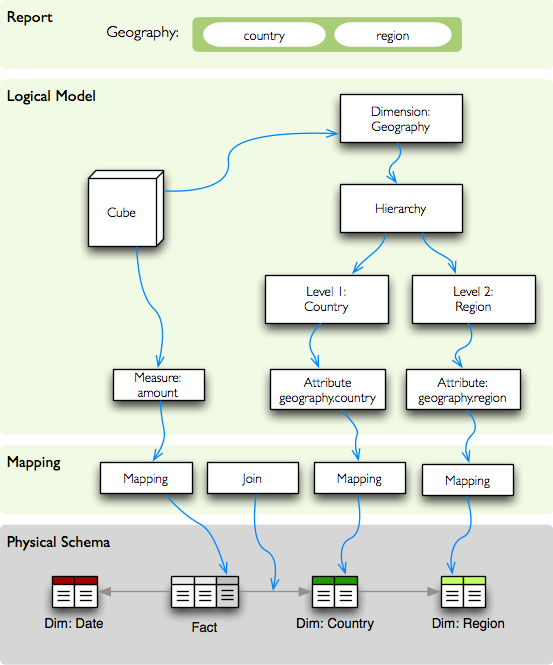
Mapping from logical model to physical data.
The logical model describes dimensions geography in which default hierarchy has two levels: country and region. Each level can have more attributes, such as code, name, population... In our example report we are interested only in geographical names, that is: country.name and region.name.
Model
The logical model is described using model metadata dictionary. The content is description of logical objects, physical storage and other additional information.
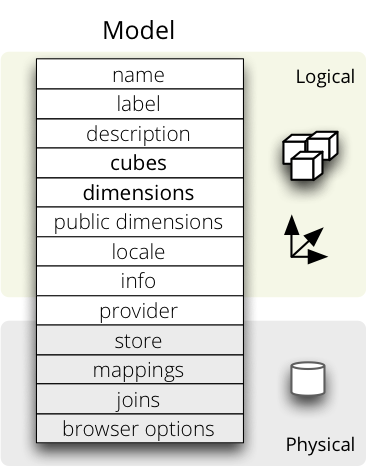
Logical model metadata
Logical part of the model description:
- name – model name
- label – human readable model label (optional)
- description – human readable description of the model (optional)
- locale – locale the model metadata are written in (optional, used for localizable models)
- cubes – list of cubes metadata (see below)
- dimensions – list of dimension metadata (see below)
- public_dimensions – list of dimension names that will be exported from the model as public and might be shared by cubes from other models. By default, all model’s dimensions are considered public.
Physical part of the model description:
- store – name of the datastore where model’s cubes are stored. Default is default. See Analytical Workspace for more information.
- mappings - backend-specific logical to physical mapping dictionary. This dictionary is inherited by every cube in the model.
- joins - backend-specific join specification (used for example in the SQL backend). It should be a list of dictionaries. This list is inherited by the cubes in the model.
- browser_options – options passed to the browser. The options are merged with options in the cubes.
Example model snippet:
{
    "name": "public_procurements",
    "label": "Public Procurements of Slovakia",
    "description": "Contracts of public procurement winners in Slovakia"
    "cubes": [...]
    "dimensions": [...]
}
Mappings and Joins
One can specify shared mappings and joins on the model-level. Those mappings and joins are inherited by all the cubes in the model.
The mappigns dictionary of a cube is merged with model’s global mapping dictionary. Cube’s values overwrite the model’s values.
The joins can be considered as named templates. They should contain name property that will be referenced by a cube.
Vsibility: The joins and mappings are local to a single model. They are not shared within the workspace.
Inheritance
Cubes in a model will inherint mappings and joins from the model. The mappings are merged in a way that cube’s mappings replace existing model’s mappings with the same name. Joins are concatenated or merged by their name.
Example from the SQL backend: Say you would like to join a date dimension table in dim_date to every cube. Then you specify the join at the model level as:
"joins": [
    {
        "name": "date",
        "detail": "dim_date.date_id",
        "method": "match"
    }
]
The join has a name specified, which is used to match joins in the cube. Note that the join contains incimplete information: it contains only the detail part, that is the dimension key. To use the join in a cube which has two date dimensions start date and end date:
"joins": [
    {
        "name": "date",
        "master": "fact_contract.contract_start_date_id",
    },
    {
        "name": "date",
        "master": "fact_sales.contract_sign_date_id",
    }
]
The model’s joins are searched for a template with given name and then cube completes (or even replaces) the join information.
For more information about mappings and joins refer to the backend documentation for your data store, such as SQL
File Representation
The model can be represented either as a JSON file or as a directory with JSON files. The single-file model specification is just a dictionary with model properties. The model directory bundle should have the following content:
- model.json – model’s master metadata – same as single-file model
- dim_*.json – dimension metadata file – single dimension dictionary
- cube_*.json – cube metadata – single cube dictionary
The list of dimensions and cubes in the model.json are merged with the dimensions and cubes in the separate files. Avoid duplicate definitions.
Example directory bundle model:
model.cubesmodel/
    model.json
    dim_date.json
    dim_organization.json
    dim_category.json
    cube_contracts.json
    cube_events.json
Model Provider and External Models
If the model is provided from an external source, such as an API or a database, then name of the provider should be specified in provider.
The provider receives the model’s metadata and the model’s data store (if the provider so desires). Then the provider generates all the cubes and the dimensions.
Example of a model that is provided from an external source (Mixpanel):
{
    "name": "Events",
    "provider": "mixpanel"
}
Note
The cubes and dimensions in the generated model are just informative for the model provider. The provider can yield different set of cubes and dimensions as specified in the metadata.
See also
- cubes.ModelProvider()
- Load a model from a file or a URL.
- cubes.StaticModelProvider()
- Create model from a dictionary.
Dimension Visibility
All dimensions from a static (file) model are shared in the workspace by default. That means that the dimensions can be reused freely among cubes from different models.
One can define a master model with dimensions only and no cubes. Then define one model per cube category, datamart or any other categorization. The models can share the master model dimensions.
To expose only certain dimensions from a model specify a list of dimension names in the public_dimensions model property. Only dimensions from the list can be shared by other cubes in the workspace.
Note
Some backends, such as Mixpanel, don’t share dimensions at all.
Cubes
Cube descriptions are stored as a dictionary for key cubes in the model description dictionary or in json files with prefix cube_ like cube_contracts.
| Key | Description |
|---|---|
| Basic | |
| name * | Cube name, unique identifier. Required. |
| label | Human readable name - can be used in an application |
| description | Longer human-readable description of the cube (optional) |
| info | Custom info, such as formatting. Not used by cubes framework. |
| dimensions * | List of dimension names or dimension links (recommended, but might be empty for dimension-less cubes). Recommended. |
| measures | List of cube measures (recommended, but might be empty for measure-less, record count only cubes). Recommended. |
| aggregates | List of aggregated measures. Required, if no measures are specified. |
| details | List of fact details (as Attributes) - attributes that are not relevant to aggregation, but are nice-to-have when displaying facts (might be separately stored) |
| Physical | |
| joins | Specification of physical table joins (required for star/snowflake schema) |
| mappings | Mapping of logical attributes to physical attributes |
| key | Fact key field or column name. If not specified, backends might either refuse to generate facts or might use some default column name such as id. |
| fact | Fact table, collection or source name – interpreted by the backend. The fact table does not have to be specified, as most of the backends will derive the name from the cube’s name. |
| Advanced | |
| browser_options | Browser specific options, consult the backend for more information |
| store | Name of a datastore where the cube is stored. Use this only when default store assignment is different from your requirements. |
Fields marked with * are required.
Example:
{
    "name": "sales",
    "label": "Sales",
    "dimensions": [ "date", ... ]

    "measures": [...],
    "aggregates": [...],
    "details": [...],

    "fact": "fact_table_name",
    "mappings": { ... },
    "joins": [ ... ]
}
Note
The key might be required by some backends, such as SQL, to be able to generate detailed facts or to get a single fact. Please refer to the backend’s documentation for more information.
Measures and Aggregates
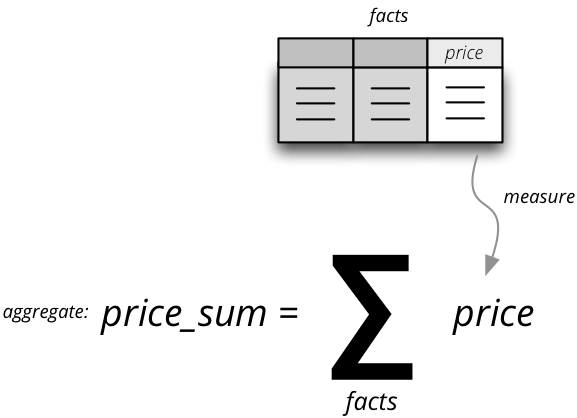
Measure and measure aggregate
Measures are numerical properties of a fact. They might be represented, for example, as a table column. Measures are aggregated into measure aggregates. The measure is described as:
- name – measure identifier (required)
- label – human readable name to be displayed (localized)
- info – additional custom information (unspecified)
- aggregates – list of aggregate functions that are provided for this measure. This property is for generating default aggregates automatically. It is highly recommended to list the aggregates explicitly and avoid using this property.
- window_size – number of elements within a window for window functions such as moving average. If not provided and function requires it then 1 (one element) is assumed.
- nonadditive – can be all (non-additive for any dimension), time (non-additive for time dimension, for example account balance) or none (default, fully additive)
Example:
"measures": [
    {
        "name": "amount",
        "label": "Sales Amount"
    },
    {
        "name": "vat",
        "label": "VAT"
    }
]
Measure aggregate is a value computed by aggregating measures over facts. It’s properties are:
- name – aggregate identifier, such as: amount_sum, price_avg, total, record_count
- label – human readable label to be displayed (localized)
- measure – measure the aggregate is derived from, if it exists or it is known. Might be empty.
- function - name of an aggregate function applied to the measure, if known. For example: sum, min, max.
- window_size – number of elements within a window for window functions such as moving average. If not provided and function requires it then 1 (one element) is assumed.
- info – additional custom information (unspecified)
Example:
"aggregates": [
    {
        "name": "amount_sum",
        "label": "Total Sales Amount",
        "measure": "amount",
        "function": "sum"
    },
    {
        "name": "vat_sum",
        "label": "Total VAT",
        "measure": "vat",
        "function": "sum"
    },
    {
        "name": "item_count",
        "label": "Item Count",
        "function": "count"
    }
]
Note the last aggregate item_count – it counts number of the facts within a cell. No measure required as a source for the aggregate.
If no aggregates are specified, Cubes generates default aggregates from the measures. For a measure:
"measures": [
    {
        "name": "amount",
        "aggregates": ["sum", "min", "max"]
    }
]
The following aggregates are created:
"aggregates" = [
    {
        "name": "amount_sum",
        "measure": "amount",
        "function": "sum"
    },
    {
        "name": "amount_min",
        "measure": "amount",
        "function": "min"
    },
    {
        "name": "amount_max",
        "measure": "amount",
        "function": "max"
    }
]
If there is a list of aggregates already specified in the cube explicitly, both lists are merged together.
Note
To prevent automated creation of default aggregates from measures, there is an advanced cube option implicit_aggergates. Set this property to False if you want to keep only explicit list of aggregates.
In previous version of Cubes there was omnipresent measure aggregate called record_count. It is no longer provided by default and has to be explicitly defined in the model. The name can be of any choice, it is not a built-in aggregate anymore. To keep the original behavior, the following aggregate should be added:
"aggregates": [
    {
        "name": "record_count",
        "function": "count"
    }
]
Note
Some aggregates do not have to be computed from measures. They might be already provided by the data store as computed aggregate values (for example Mixpanel’s total). In this case the measure and function serves only for the backend or for informational purposes. Consult the backend documentation for more information about the aggregates and measures.
See also
- cubes.Cube
- Cube class reference.
- cubes.Measure
- Measure class reference.
- cubes.MeasureAggregate
- Measure Aggregate class reference.
Customized Dimension Linking
It is possible to specify how dimensions are linked to the cube. The dimensions list might contain, besides dimension names, also a specification how the dimension is going to be used in the cube’s context. The specification might contain:
- hierarchies – list of hierarchies that are relevant for the cube. For example the date dimension might be defined as having day granularity, but some cubes might be only at the month level. To specify only relevant hierarchies use hierarchies metadata property:
- exclude_hierarchies – hierarchies to be excluded when cloning the original dimension. Use this instead of hierarchies if you would like to preserve most of the hierarchies and remove just a few.
- default_hierarchy_name – name of default hierarchy for a dimension in the context of the cube
- cardinality – cardinality of the dimension with regards to the cube. For example one cube might contain housands product types, another might have only a few, but they both share the same products dimension
- nonadditive – nonadditive behavior of the dimension in the cube
- alias – how the dimension is going to be called in the cube. For example, you might have two date dimensions and name them start_date and end_date using the alias
Example:
{
    "name": "churn",

    "dimensions": [
        {"name": "date", "hierarchies": ["ym", "yqm"]},
        "customer",
        {"name": "date", "alias": "contract_date"}
    ],

    ...
}
The above cube will have three dimensions: date, customer and contract_date. The date dimension will have only two hierarchies with lowest granularity of month, the customer dimension will be assigned as-is and the contract_date dimension will be the same as the original date dimension.
Dimensions
Dimension descriptions are stored in model dictionary under the key dimensions.
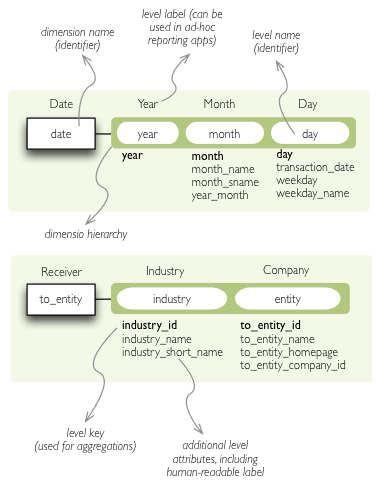
Dimension description - attributes.
The dimension description contains keys:
| Key | Description |
|---|---|
| Basic | |
| name * | dimension name, used as identifier |
| label | human readable name - can be used in an application |
| description | longer human-readable description of the dimension (optional) |
| info | custom info, such as formatting. Passed to the front-end. |
| levels | list of level descriptions |
| hierarchies | list of dimension hierarchies |
| default_hierarchy_name | name of a hierarchy that will be used as default |
| Advanced | |
| cardinality | dimension cardinality (see Level for more info) |
| nonadditive | used when the dimension is nonadditive or semiadditive |
| role | dimension role |
| category | logical category (user oriented metadata) |
| template | name of a dimension that will be used as template |
Fields marked with * are required.
If no levels are specified, then one default level will be created.
If no hierarchy is specified, then the default hierarchy will contain all levels of the dimension.
Example:
{
    "name": "date",
    "label": "Dátum",
    "levels": [ ... ]
    "hierarchies": [ ... ]
}
Use either hierarchies or hierarchy, using both results in an error.
Dimension Templates
If you are creating more dimensions with the same or similar structure, such as multiple dates or different types of organisational relationships, you might create a template dimension and then use it as base for the other dimensions:
"dimensions" = [
    {
        "name": "date",
        "levels": [...]
    },
    {
        "name": "creation_date",
        "template": "date"
    },
    {
        "name": "closing_date",
        "template": "date"
    }
]
All properties from the template dimension will be copied to the new dimension. Properties can be redefined in the new dimension. In that case, the old value is discarded. You might change levels, hierarchies or default hierarchy. There is no way how to add or drop a level from the template, all new levels have to be specified again if they are different than in the original template dimension. However, you might want to just redefine hierarchies to omit unnecessary levels.
Note
In mappings name of the new dimension should be used. The template dimension was used only to create the new dimension and the connection between the new dimension and the template is lost. In our example above, if cube uses the creation_date and closing_date dimensions and any mappings would be necessary, then they should be for those two dimensions, not for the date dimension.
Nonadditive
There are cases where it is not meaningful to add values over certain dimension. For example it has no sense to add account balance over time. For such dimension the nonadditive value can be specified:
- all – dimension is nonadditive
- time – dimension can not be added over dimensions with role time
- none – dimension is fully additive (same as if no value was specified)
Level
Dimension hierarchy levels are described as:
| Key | Description |
|---|---|
| name * | level name, used as identifier |
| label | human readable name - can be used in an application |
| attributes | list of other additional attributes that are related to the level. The attributes are not being used for aggregations, they provide additional useful information. |
| key | key field of the level (customer number for customer level, region code for region level, year-month for month level). key will be used as a grouping field for aggregations. Key should be unique within level. |
| label_attribute | name of attribute containing label to be displayed (customer name for customer level, region name for region level, month name for month level) |
| order_attribute | name of attribute that is used for sorting, default is the first attribute (key) |
| cardinality | symbolic approximation of the number of level’s members |
| role | Level role (see below) |
| info | custom info, such as formatting. Not used by cubes framework. |
Fields marked with * are required.
If no attributes are specified then only one attribute is assumed with the same name as the level.
If no key is specified, then first attribute is assumed.
If no label_attribute is specified, then second attribute is assumed if level has more than one attribute, otherwise the first attribute is used.
Example of month level of date dimension:
{
    "month",
    "label": "Mesiac",
    "key": "month",
    "label_attribute": "month_name",
    "attributes": ["month", "month_name", "month_sname"]
},
Example of supplier level of supplier dimension:
{
    "name": "supplier",
    "label": "Dodávateľ",
    "key": "ico",
    "label_attribute": "name",
    "attributes": ["ico", "name", "address", "date_start", "date_end",
                    "legal_form", "ownership"]
}
See also
- cubes.Dimension
- Dimension class reference
- cubes.create_dimension()
- Create a dimension object from a description dictionary.
- cubes.Level
- Level class reference
- cubes.create_level()
- Create level object from a description dictionary.
Note
Level attribute names have to be unique within a dimension that owns the level.
Cardinality
The cardinality property is used optionally by backends and front-ends for various purposes. The possible values are:
- tiny – few values, each value can have it’s representation on the screen, recommended: up to 5.
- low – can be used in a list UI element, recommended 5 to 50 (if sorted)
- medium – UI element is a search/text field, recommended for more than 50 elements
- high – backends might refuse to yield results without explicit pagination or cut through this level.
Hierarchy
Hierarchies are described as:
| Key | Description |
|---|---|
| name | hierarchy name, used as identifier |
| label | human readable name - can be used in an application |
| levels | ordered list of level names from top to bottom - from least detailed to most detailed (for example: from year to day, from country to city) |
Required is only name.
Example:
"hierarchies": [
    {
        "name": "default",
        "levels": ["year", "month"]
    },
    {
        "name": "ymd",
        "levels": ["year", "month", "day"]
    },
    {
        "name": "yqmd",
        "levels": ["year", "quarter", "month", "day"]
    }
]
Attributes
Dimension level attributes can be specified either as rich metadata or just simply as strings. If only string is specified, then all attribute metadata will have default values, label will be equal to the attribute name.
| Key | Description |
|---|---|
| name | attribute name (should be unique within a dimension) |
| label | human readable name - can be used in an application, localizable |
| order | natural order of the attribute (optional), can be asc or desc |
| format | application specific display format information |
| missing_value | Value to be substituted when there is no value (NULL) in the source (backend has to support this feature) |
| locales | list of locales in which the attribute values are available in (optional) |
| info | custom info, such as formatting. Not used by cubes framework. |
The optional order is used in aggregation browsing and reporting. If specified, then all queries will have results sorted by this field in specified direction. Level hierarchy is used to order ordered attributes. Only one ordered attribute should be specified per dimension level, otherwise the behavior is unpredictable. This natural (or default) order can be later overridden in reports by explicitly specified another ordering direction or attribute. Explicit order takes precedence before natural order.
For example, you might want to specify that all dates should be ordered by default:
"attributes" = [
    {"name" = "year", "order": "asc"}
]
Locales is a list of locale names. Say we have a CPV dimension (common procurement vocabulary - EU procurement subject hierarchy) and we are reporting in Slovak, English and Hungarian. The attributes will be therefore specified as:
"attributes" = [
    {
        "name" = "group_code"
    },
    {
        "name" = "group_name",
        "order": "asc",
        "locales" = ["sk", "en", "hu"]
    }
]
group name is localized, but group code is not. Also you can see that the result will always be sorted by group name alphabetical in ascending order.
In reports you do not specify locale for each localized attribute, you specify locale for whole report or browsing session. Report queries remain the same for all languages.
Roles
Some dimensions and levels might have special, but well known, roles. One example of a role is time. There might be more recognized roles in the future, for example geography.
Front-ends that respect roles might provide different user interface elements, such as date and time pickers for selecting values of a date/time dimension. For the date picker to work, the front-end has to know, which dimension represents date and which levels of the dimension represent calendar units such as year, month or day.
The role of a dimension has to be explicitly stated. Front-ends are not required to assume a dimension named date is really a full date dimension.
The level roles do not have to be mentioned explicitly, if the level name can be recognized to match a particuliar role. For example, in a dimension with role time level with name year will have automatically role year.
Level roles have to be specified when level names are in different language or for any reason don’t match english calendar unit names.
Currently there is only one recognized dimension role: time. Recognized level roles with their default assignment by level name are: year, quarter, month, day, hour, minute, second, week, weeknum, dow, isoyear, isoweek, isoweekday.
The key value of level with role week is expected to have format YYYY-MM-DD.